
JupyterLab 4.3 and Notebook 7.3 are available!
JupyterLab 4.3.0 has been released! This new minor release of JupyterLab includes 1 new feature, 42 enhancements, 62 bug fixes, 48 maintenance tasks and 35 documentation improvements. There were 38 contributors to this release including 18 new contributors to JupyterLab.
Jupyter Notebook 7.3.0 has also been released, including many of the fixes and enhancements in this JupyterLab 4.3.0 release. While the releases on GitHub provide additional detail on the updates made to both JupyterLab 4.3 and Notebook 7.3, this article highlights some particularly notable changes.
Extension authors can refer to the Extension Migration Guide for information on API updates and details regarding changes to core packages.
Minimap
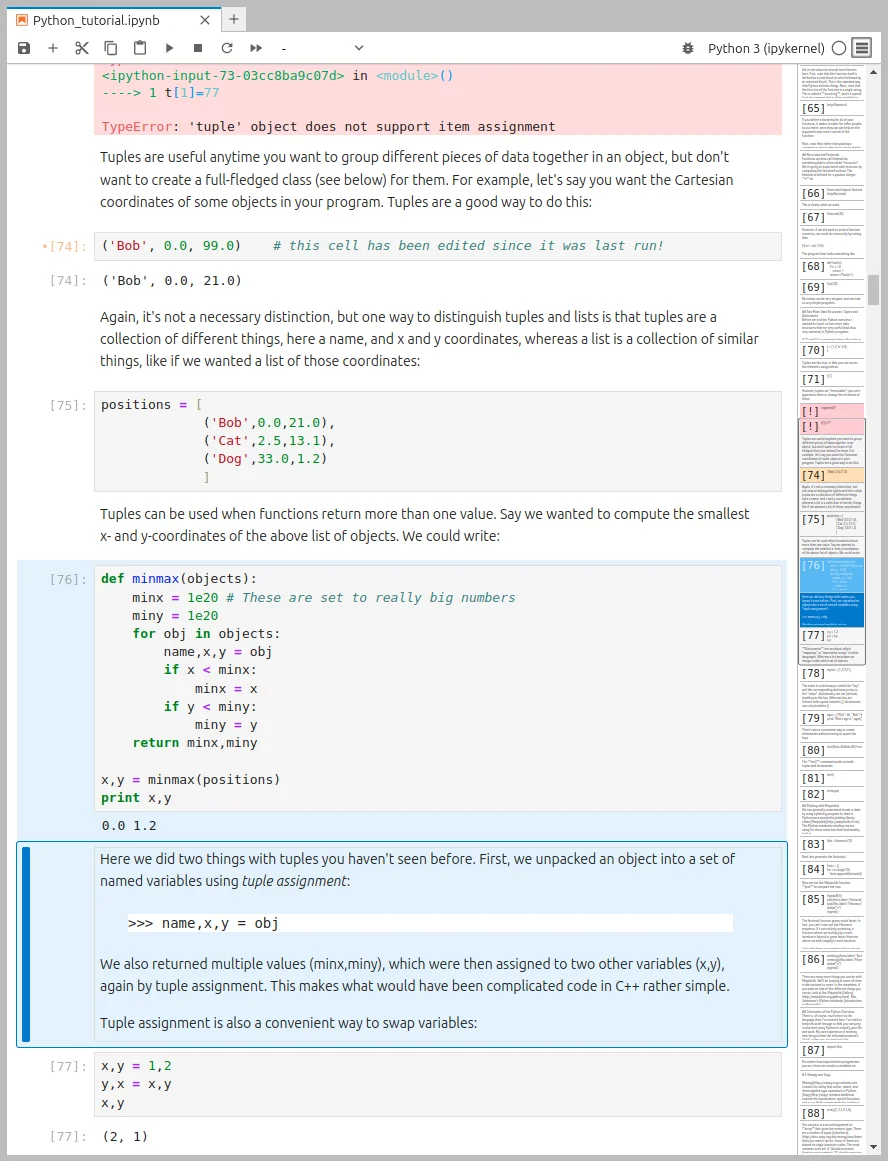
The virtual scrollbar now acts as a minimap and exposes information on whether a cell:
- is running/scheduled (
[*]), idle ([ ]) or was already run (e.g.[1]), - was modified since it was last executed (“dirty”) — orange background,
- has an output that contains an error — red background,
- is markdown/code (
[ ]/[*]/[1]for code, nothing for markdown), - an how much text/code it contains.
To enable the minimap, click on the hamburger icon (≡) which appears in the notebook toolbar. If you do not see the hamburger icon, go to Settings → Notebook → Windowing mode and choose “full”.
Fullscreen mode
JupyterLab now offers two ways to toggle the full screen mode from within the application:
- using the View → Appearance → Fullscreen Mode menu entry,
- using a customizable shortcut, by default F11 (custom shortcuts are supported in Chrome, Safari and Edge).
File browser enhancements
The file browser now:
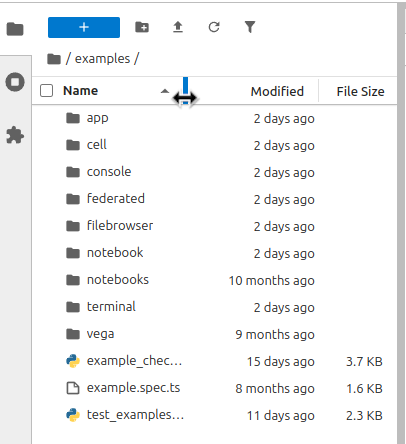
- supports resizing the columns and remembers the column sizes after reloading JupyterLab,
- supports uploading folders by drag-and-drop,
- supports navigation with a single click (opt-in in JupyterLab, default in Jupyter Notebook),
- has the file filter collapsed by default (funnel icon), increasing the space available.
Server-side execution and collaboration
JupyterLab 4.2 added the option for extensions to implement server-side execution, which preserves outputs created when the browser window is closed or disconnected. The server-side execution builds on the same shared models API as the real-time collaboration (RTC).
You can try these features by installing extensions:
- jupyter-server-nbmodel* provides server-side execution for jupyter-server,
- jupyter-collaboration provides the real-time collaboration features,
- jupyverse is an alternative server (a replacement for jupyter-server) which supports server-side execution.
* while jupyter-server-nbmodel is developed by maintainers of JupyterLab, as of the JupyterLab 4.3.0 release date it is not an official Project Jupyter extension.
Improved kernel and server interactions
The previous release enabled connecting to external kernels, such as those spawned by a third-party application like Blender. In this release the kernel selector dialog was improved to also show the external kernels.
The previous release improved the awareness of the kernel/kernel specification distinction by providing both tree and list view in the kernels sidebar panel, but only the tree view featured the kernel identifiers. In this release both the list and tree view show the kernel identifier stub.
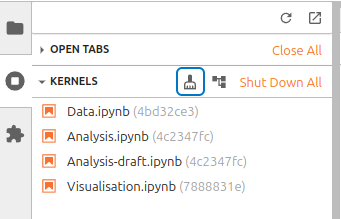
A new toolbar button was added in the kernel allowing to shut down unused kernels (kernels with no widget attached).
Full Width Notebook
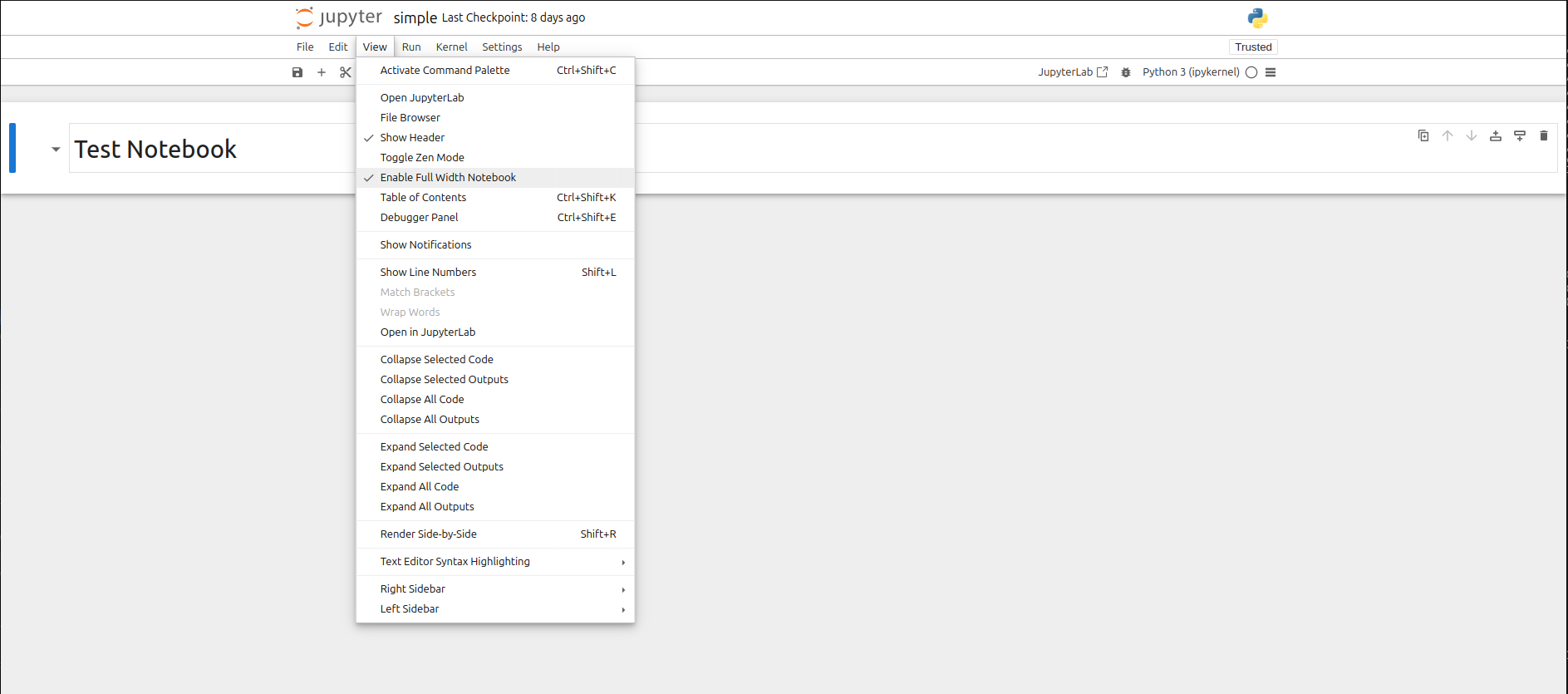
In Jupyter Notebook 7.3, it is now possible to configure the notebook to take up the full width of the page via:
- a setting that can be defined by a user via the Settings Editor
- the
View > Enable Full Width Notebookmenu entry - the command palette, searching for
Enable Full Width Notebook
JupyterLab 3 end of maintenance
As a reminder, JupyterLab 3 will reach its end of maintenance date on December 31, 2024, anywhere on Earth. Users are highly encouraged to update to JupyterLab 4 as soon as possible.
For more information, please refer to the announcement post.
Acknowledgements
Thank you to all the new contributors, the Jupyter Frontends team hopes to see you back!
- JupyterLab: @jgoodson, @Wzixiao, @krishanbhasin-px, @hnben, @sanskriti2005, @achhina, @mahendrapaipuri, @Renegade334, @Nazeeh21, @pauldruce, @EdsterG, @gderocher, @dhysdrn, @algonell, @nekomeowww, @mjpsyapse, @kaushalaaditya99, @Nagidrop
- Notebook: @bluestealth, @andyscho, @algonell, @gjmooney
And thank you to returning contributors for their continued work!
- JupyterLab: @afshin, @ajbozarth, @andrewfulton9, @andrii-i, @brichet, @cmarmo, @Darshan808, @davidbrochart, @fcollonval, @gabalafou, @HaudinFlorence, @itsmevichu, @JasonWeill, @joaopalmeiro, @jtpio, @krassowski, @maitreya2954, @Mehak261124, @NexVeridian, @RRosio
- Notebook: @JasonWeill, @jtpio, @krassowski, @martinRenou, @RRosio
Thank you to all the people who tested and provided feedback for the pre-releases! Lastly, thank you to the weekly triage group for triaging JupyterLab, Notebook and JupyterLab Desktop issues: @JasonWeill, @krassowski, @RRosio, @andrii-i among others who attend.