
Plasma: A learning platform powered by Jupyter
Jupyter has been a great choice for education for many years. The Jupyter Notebook has become one of the most popular tools to conduct workshops, tutorials, and teach online classes.
Recently we have seen the emergence and adoption of JupyterHub distributions to facilitate the deployment of Jupyter-based platforms, both on private servers and in the cloud.
We would like to share with you an open-source learning platform called Plasma, built with Jupyter at its core.

JupyterHub Distributions
JupyterHub is a highly customizable and modular framework. To simplify its adoption, JupyterHub distributions target specific deployment scenarios with opinionated defaults. They make it easier to deploy JupyterHub on a single server and in the cloud.
There are currently two popular JupyterHub distributions:
- The Littlest JupyterHub (TLJH): for running JupyterHub on a single machine, targeting between 1 and 100 users
- Zero To JupyterHub on Kubernetes (ZTJH): for running JupyterHub on top of Kubernetes, to scale to a large number of users and machines
Although not an official distribution, jupyterhub-deploy-docker is also a good resource for a full Docker-based setup. It runs JupyterHub itself in a Docker container and orchestrates the stack with Docker Compose.
The Plasma Stack
Plasma stands for PLateforme d’e-Learning pour l’Analyse de données Scientifiques MAssives, which can be translated to “An e-learning platform for massive scientific data analysis”.
The platform is typically meant to be deployed on high-end machines with multiple cores and GB of RAM.
Some of the requirements for the Plasma project fall somewhere between the TLJH and ZTJH distributions:
- The deployment should be on a single server, and reproducible on other machines too (running on Ubuntu 18.04+)
- It should support multiple user environments with different sets of dependencies
- Users should authenticate as system users and their data should be persisted in their home directories on the host machine
Although TLJH doesn’t officially support container technology, its plugin system opens the door to many other use cases.
Because of this and to foster the TLJH plugin ecosystem, we decided to develop the Plasma stack as a plugin for TLJH and consolidate the deployment story with Ansible playbooks.
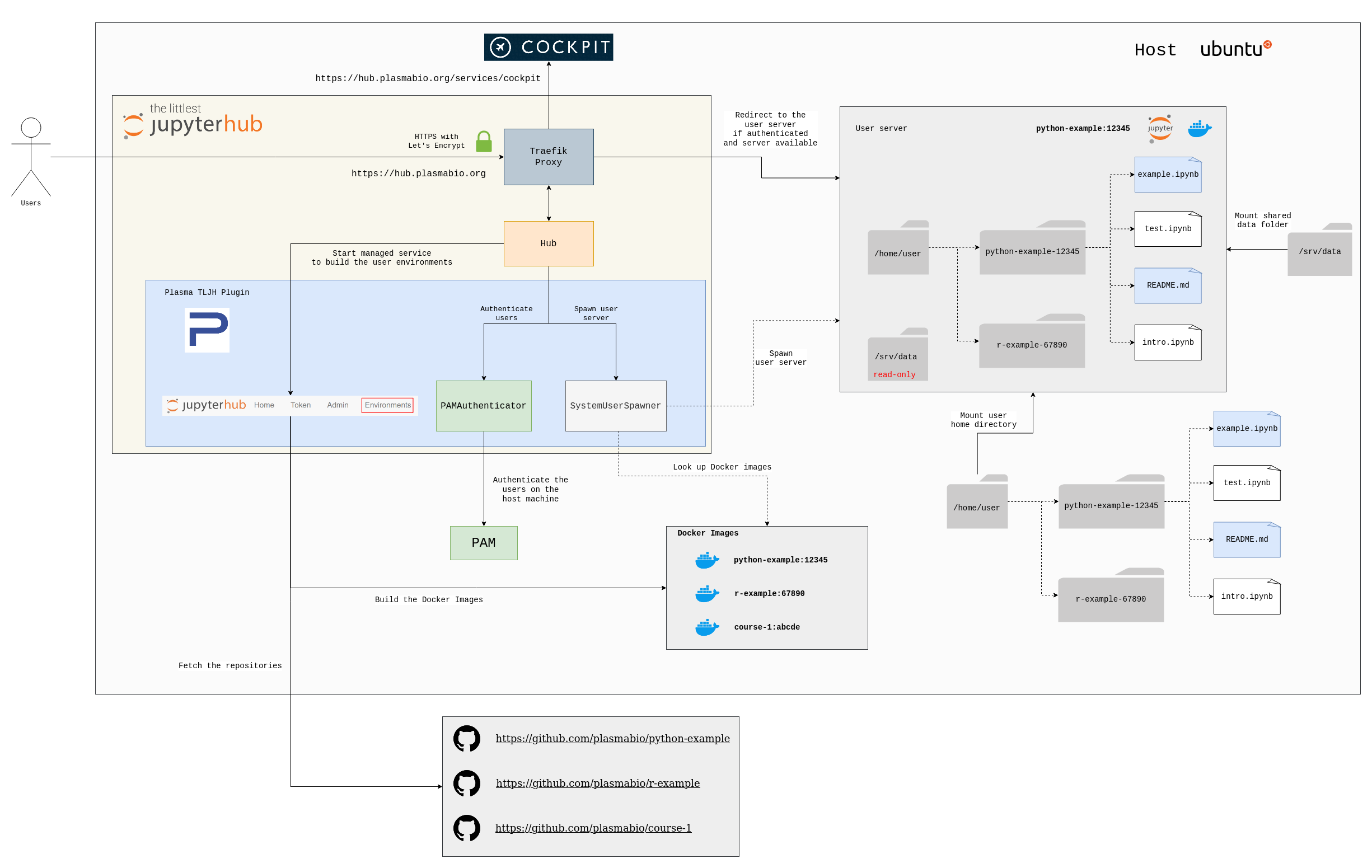
Plasma is an opinionated JupyterHub stack powered by The Littlest JupyterHub, with the following defaults:
- PAMAuthenticator to authenticate JupyterHub as users existing on the host machine
- SystemUserSpawner to start single-user servers in Docker containers, using the system user home directories for data persistence
To enable extra functionalities, the Plasma stack relies on:
- The tljh-repo2docker plugin to create multiple user environments
- The tljh-plasma plugin to define the JupyterHub config
- Ansible playbooks to automate the deployment and configuration of the server and add additional tools
The Plasma stack also contains tools to monitor the system, create and configure users, and add hub admins. It can be visualized with the diagram below:
The stack is defined in the following repository: https://github.com/plasmabio/plasma
There is also extensive documentation with detailed explanations on how to deploy the stack on a new server: https://docs.plasmabio.org
A repo2docker plugin for The Littlest JupyterHub
The tljh-repo2docker plugin lets JupyterHub admins create new user environments using repo2docker. This plugin starts a JupyterHub service to manage user environments from the JupyterHub UI.
For those already using Binder, the idea will sound very familiar. Under the hood, the tljh-repo2docker plugin also uses repo2docker to build the Docker images. It follows the same patterns and naming conventions as Binder, which makes it easier and more natural to test the environments on Binder before adding them to JupyterHub.
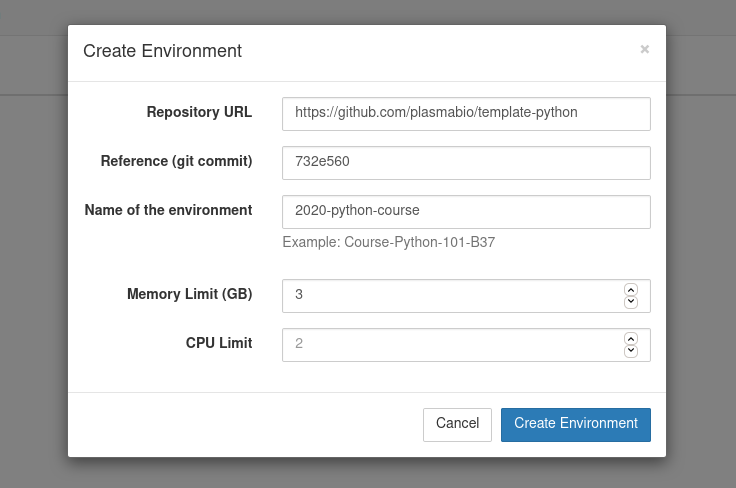
New environments can be added by clicking on the Add New button and providing a URL to the repository. Optional names, memory, and CPU limits can also be set for the environment:
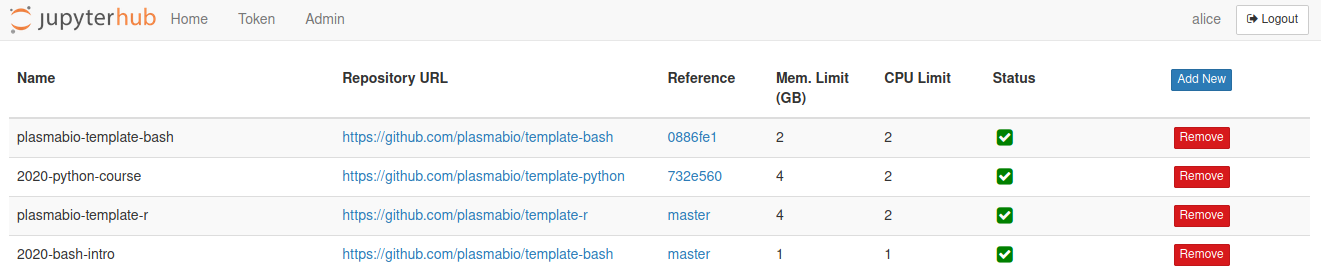
The Environments page shows the list of built environments, as well as the ones currently being built:
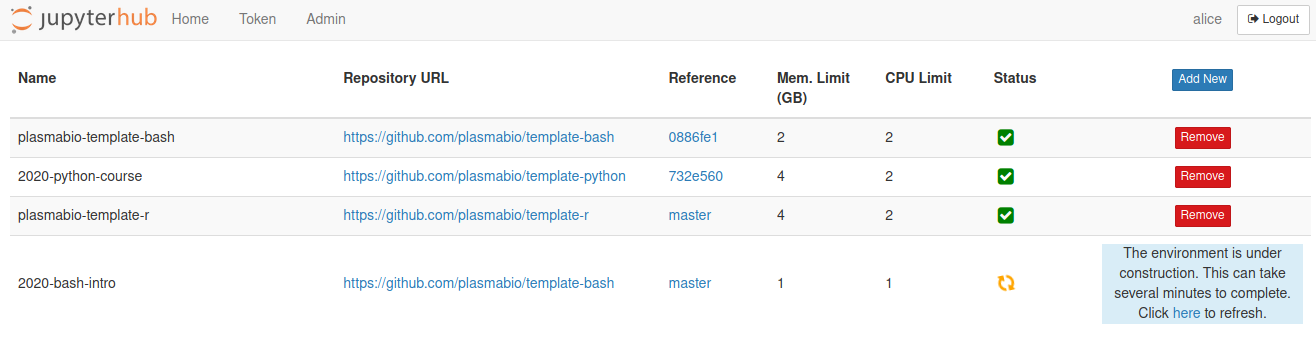
The status of the environment changes once the underlying Docker image has been built:
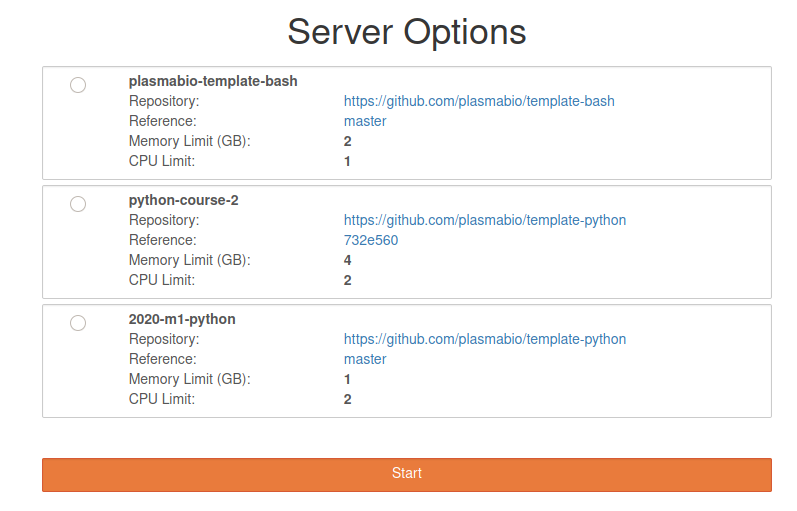
Once ready, the environments can be selected from the JupyterHub spawn page:
Because it is separate from the Plasma stack, this plugin can also be used for other temporary TLJH deployments on a virtual machine. For example, the organizer of a workshop can prepare a list of environments before the event, just like they would with Binder.
Automating deployments with Ansible
To minimize the number of manual steps involved in the setup of the stack, Plasma also provides a list of Ansible playbooks.
Ansible is an open-source tool to automate the provisioning of servers, configuration management, and application deployment.
Playbooks define a list of tasks that should be executed and declare the desired state of the server.
The list of playbooks and instructions on how to use them are provided in the Installation section of the documentation.
Overall, the playbooks make it easier to perform upgrades, to automate the deployment process, and to replicate the setup at other institutions and universities.
Here is an example of what an upgrade looks like:
This playbook defines the tasks to:
- download the TLJH installer
- execute the TLJH installer to perform the upgrade
- update the TLJH plugins
- set the idle culler timeout
- set the default memory and CPU limits
- reload JupyterHub
- pulls the latest
jupyter/repo2dockerDocker image
Further reading
- The Plasma documentation: https://docs.plasmabio.org/
- To use the tljh-repo2docker as a standalone plugin for TLJH: https://github.com/plasmabio/tljh-repo2docker
- Also part of the Plasma project, the new ipycytoscape package for interactive graph visualization in Jupyter: https://blog.jupyter.org/interactive-graph-visualization-in-jupyter-with-ipycytoscape-a8828a54ab63
Acknowledgements
The development of the Plasma stack at QuantStack was funded as part of the Plasma project, led by Claire Vandiedonck, Pierre Poulain, and Sandrine Caburet, associate professors at Université de Paris.
Sponsors to the Plasma initiative include:
- Région Île-de-France, via the “Trophées franciliens de l’innovation numérique dans le supérieur” (EdTech 2018) grant program,
- Université de Paris, via the Initiative of Excellence (IdEx) Label and its “inovating teaching” grant program,
- EUR G.E.N.E., the graduate school on Genetics and Epigenetics,
- the university training “Création, analyse et valorisation de données biologiques omiques” (DU Omiques).